Building Bucephalus: Granola for the Real World
8 October, 2026
Every online meeting I'm in has a notetaker. Granola, Otter, whatever. I can always go back and see what was said and what we agreed on. But the conversations that actually matter to me often happen offline: in a room, at a café, in class. Those just disappear.
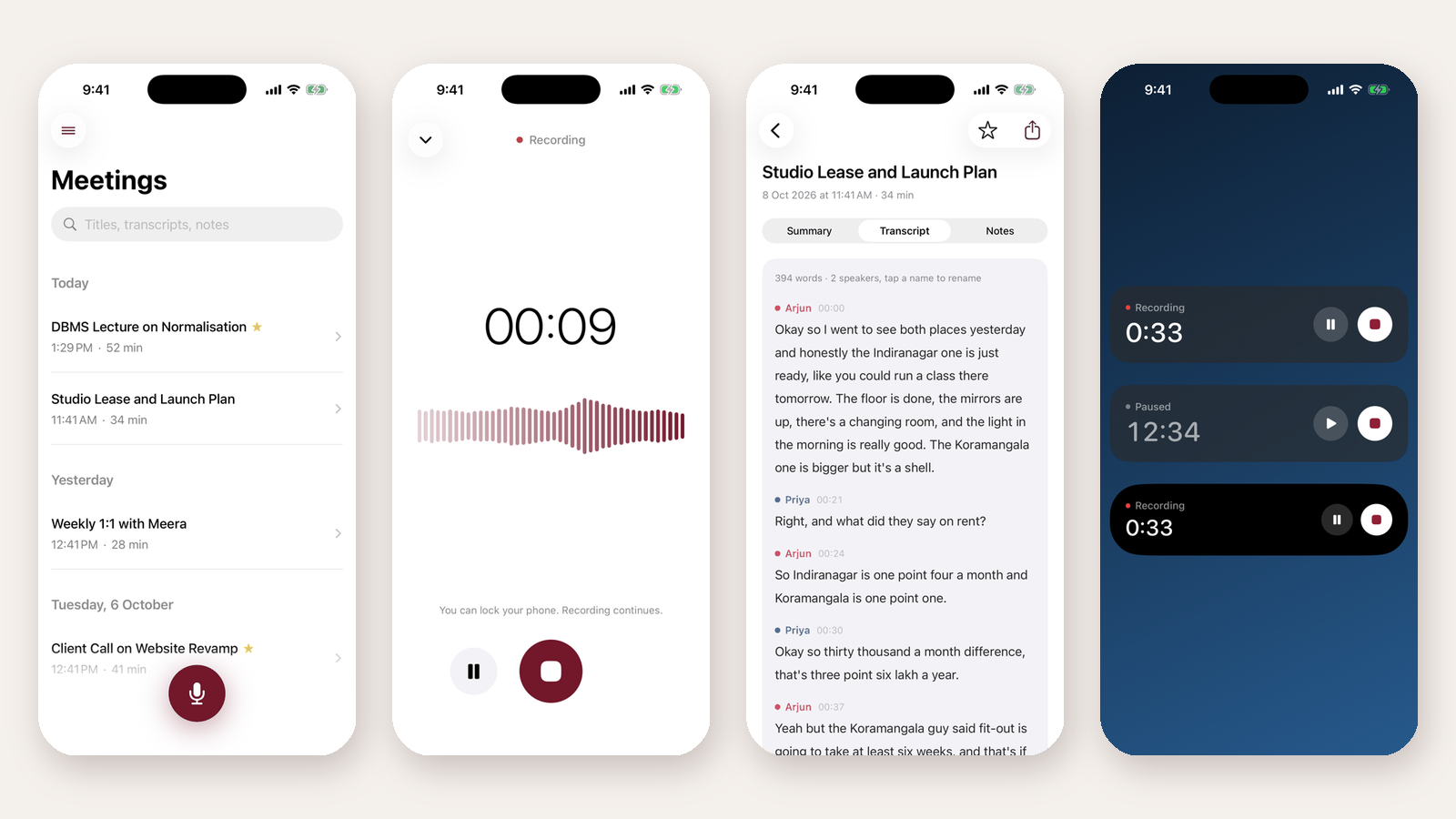
So I built Bucephalus, an iPhone app for exactly that. Press record, put the phone on the table, lock it, and talk. When you stop, it transcribes the conversation on the phone, works out who said what, and writes a clean summary with key points, decisions and action items.
What it does
- Records with the screen off. Pause, resume and stop from the lock screen or the Dynamic Island, or start it with the Action Button.
- Transcribes on the phone. Audio never leaves the device.
- Knows who spoke. Speaker labels you can rename ("Speaker 1" becomes "Arjun"), and the summary uses them.
- Summarises with your own key. OpenAI or Anthropic; only the transcript text is sent.
- Notes per meeting, with Markdown that formats as you type.
The classroom test
The first version used Apple's built-in speech model. It was fine with the phone right next to me. Then I tried it in class, sitting about 10 metres from my teacher in a silent room, and it caught a dozen words in five minutes. The same lecture through Wispr Flow on my Mac came out solid, so the audio wasn't the problem.
So I pulled the class recordings off the phone and ran them through a few models on my Mac:
- Apple SpeechAnalyzer: about 13 words. Unusable.
- Apple + boosted audio: about 130 words, mostly garbled.
- Whisper large-v3 turbo: coherent, but it skipped chunks and got stuck repeating one sentence.
- NVIDIA Parakeet v2: the actual lecture, formulas and all.
Parakeet runs on the iPhone's Neural Engine through FluidAudio, which I was already using for speaker labels. One afternoon later the app was on Parakeet, and the class recordings came out great.
Lesson: don't guess which model is better. Record the real situation and compare.
How it's built
Native SwiftUI on iOS 26. SwiftData for storage, with versioned schemas and a daily backup so an update can never eat your meetings. Parakeet for transcription, FluidAudio's offline diarizer for speaker labels, ActivityKit for the lock screen, and App Intents for the Action Button and Siri. I built it pair-programming with Claude Code.
Try it
It's open source under MIT. It isn't on the App Store yet, so you build it with Xcode. Everything is in the README. Next up: asking questions across all your meetings, and sending action items to Reminders.
If you try it in your own classes or meetings, I'd love to hear how it does.